
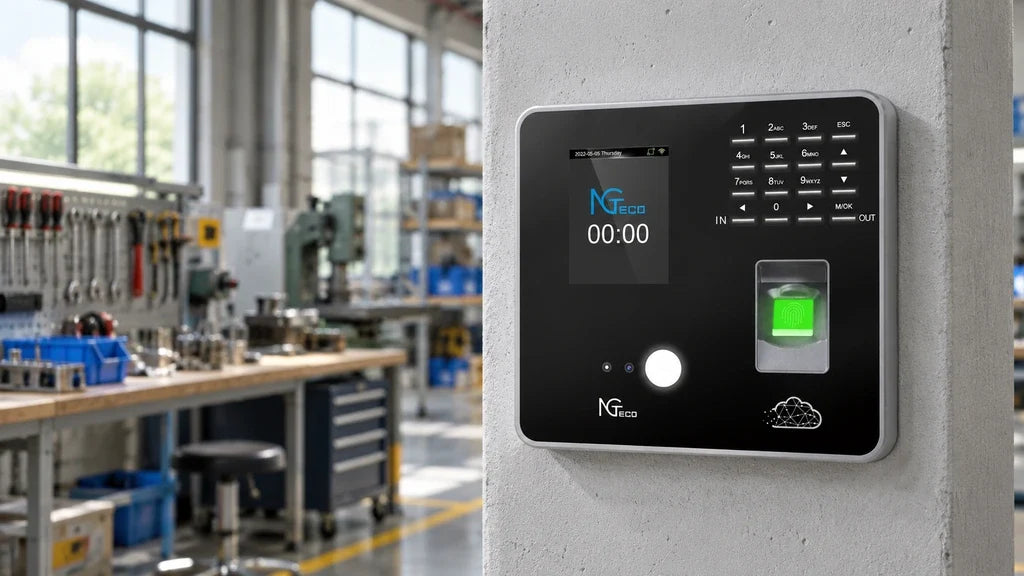
An attendance machine is a device that records an employee’s clock-in and clock-out events for a business timekeeping process. At its simplest, it ties an enrolled employee to a timestamp. The most useful setup also gives managers a practical way to review those records, resolve missing punches, and prepare information for the next payroll step without treating the terminal itself as payroll or scheduling software.
For a quick answer:
- An attendance machine records who punched and when the event occurred.
- The identity method may be a fingerprint, face, password or PIN, or ID card, depending on the model.
- A reliable record depends on correct enrollment, device time, and a clear correction process.
- Managers may review records at the device, export them by USB, or use a connected app or cloud workflow.

Define an Attendance Machine in Plain Terms
An attendance machine is the physical point where employees register the start or end of work. It is also commonly called a time clock, clock-in machine, or employee time clock. The different names describe the same basic job: creating a time-stamped attendance event that the business can later review.
The device does not automatically know every detail of the workday. It only records the event and the identity method accepted at that moment. A business still needs to decide which events employees should record, who may correct a missed punch, and how managers will review the report before payroll is finalized.
That distinction matters when comparing products. Some devices are intended for a simple, on-site record and USB export. Others are part of a connected workflow that makes recent attendance information available away from the terminal. Neither approach replaces a written timekeeping policy, payroll provider, or manager judgment.
Identify the Information a Device Can Capture
An attendance time clock creates a useful record when three pieces of information line up: the enrolled employee, the punch timestamp, and the type of event the device or workflow is configured to recognize. The precise fields in a report depend on the device and the selected software or export format.
| Record Element | What It Helps Establish | What to Check During Setup |
|---|---|---|
| Employee identity | Which enrolled person made the punch | Each employee has the correct profile and identifier |
| Timestamp | When the punch was recorded | Device date, time zone, and daylight-saving settings are correct |
| Entry method | Whether the punch used a fingerprint, face, card, or PIN | The permitted methods match the workforce and privacy process |
| Punch status or event | Whether the workflow distinguishes an in or out event | Staff understand which action to choose and how mistakes are corrected |
| Record history | The events a manager can review or export | The team knows where records are stored and how often to retrieve them |
An attendance record is only as dependable as its setup. For example, a correct fingerprint template cannot fix an incorrect device time, and an accurate timestamp does not explain a missed punch by itself. Establish an enrollment check, verify the clock before rollout, and give employees one documented fallback when the normal method cannot be used.
Compare Fingerprint, Face, Password, and Card Entry
A fingerprint attendance machine is one type of attendance machine, not a requirement for every business. The best entry method depends on how employees arrive, whether hands are likely to be wet or gloved, what backup the business can support, and the privacy requirements that apply to the workforce.
| Entry Method | Enrollment Need | Contact Level |
Depends on a Physical Credential? |
Practical Fallback Planning |
|---|---|---|---|---|
| Fingerprint | Capture a usable fingerprint template | Contact required | No | Provide another approved method for an unreadable finger |
| Face | Capture a facial template and use a suitable placement | Contactless | No | Plan for lighting, camera position, and a backup method |
| Password or PIN | Assign and securely manage a code | Contactless | No | Avoid sharing and define how a forgotten code is handled |
| ID card | Issue and manage a card | Contactless | Yes | Replace lost cards and decide how staff punch before replacement |
Multiple methods can reduce avoidable exceptions because a manager does not have to treat every recognition problem as an attendance problem. However, offering more than one method does not remove the need for controls. Decide who can enroll or change an identity method, keep the process consistent, and seek appropriate legal guidance before collecting or retaining biometric information.
Explain How Managers Retrieve Attendance Records
Managers should choose the retrieval workflow before choosing the terminal. A time attendance machine may keep records locally for review, make them available as a USB export, or synchronize them to a connected platform. Those options serve different operating needs.
| Retrieval Workflow | Best Fit | Manager’s Routine | Key Buying Question |
|---|---|---|---|
| On-device review | A manager works at the same site as the terminal | Check recent punches at the device | Is the display and menu practical for the information you need? |
| USB export | A team wants an offline process and periodic reporting | Export records on a consistent schedule and review the file | Which report file and fields does the device produce? |
| App or cloud-connected review | A manager needs to review records away from the terminal | View synced information and download reports for a selected period | What network setup and account workflow does the device require? |
The retrieval method should match the real review cadence. A small office that reviews time records at the end of each pay period may value a straightforward USB process. A manager who needs to check attendance while away from the site may prefer a connected workflow. In either case, set a regular review point so a missing or duplicate punch is addressed while the details are still clear.
Before purchase, ask for a sample report or confirm the export and review steps that matter to your payroll process. A terminal can supply attendance data, but the business remains responsible for checking exceptions, approving any corrections, and passing the final information to its payroll workflow.
Match an NGTeco Model to the Record-Access Workflow
The right NGTeco attendance machine depends first on how the business needs to access punch records. Our current U.S. storefront offers two distinct paths that fit the workflows above.
| Workflow Need | Model to Consider | Why It Fits |
|---|---|---|
| Offline, on-site records with periodic USB export | Basic Time Clock AS10 | AS10 is an offline time clock with fingerprint and password entry, USB 2.0 Host communication, and no Wi-Fi or cloud requirement. |
| Connected review with multiple punch-in choices | Cloud Time Clock TC1 | TC1 supports face, fingerprint, password, and ID-card entry. It connects to NGTeco Office for a cloud-based attendance workflow and can store punches while the network is down before syncing them after reconnection. |
AS10 suits a business that wants the clock to remain a self-contained attendance point and intends to take records to the next step by USB. It is not the model to choose for remote app or cloud review. TC1 suits a team that needs several identity options and a connected record-access workflow. Its current product page lists support for up to 200 users and 30,000 logs, so confirm that the capacity and review process fit the team before rollout.
Both paths benefit from the same operational discipline: enroll employees carefully, test each allowed entry method, verify a sample report, and explain how a missed punch will be corrected. The machine records the event. A clear process turns that event into an attendance record managers can use.

Choose the Attendance Machine Around the Record Workflow
Start with the records your manager must retrieve and how often they need them. Choose AS10 when an offline fingerprint and password workflow with USB export matches the business. Choose TC1 when your team needs four entry methods and connected access through NGTeco Office. In both cases, confirm the report process before deployment so the attendance machine supports accurate review rather than adding a new administrative task.
Frequently Asked Questions
Q1: Is an Attendance Machine the Same as a Time Clock?
Usually, yes. “Attendance machine,” “time clock,” and “clock-in machine” often describe a terminal that records employee punch events. The exact features can differ, especially in how the device verifies identity and how a manager retrieves records, so compare the workflow rather than relying on the label alone.
Q2: Does an Attendance Machine Calculate Payroll Automatically?
Not necessarily. An attendance machine supplies punch records that can support time review and payroll preparation, but payroll calculations, pay rules, and approvals may happen in a separate process. Confirm which reports and calculations are available before assuming a time clock replaces payroll software.
Q3: Can an Attendance Machine Work Without Internet Access?
Yes, some can. Our AS10 is designed for an offline workflow with no Wi-Fi, network, or cloud requirement, and records can be exported by USB. A connected model may also retain punches during a temporary network interruption, but it needs connectivity to synchronize information for remote review.
Q4: What Happens If an Employee Cannot Use the Primary Verification Method?
The business should use a documented fallback approved for that employee, such as another configured identity method or a manager-led correction process. Test the fallback during enrollment rather than waiting for a busy shift. For biometric methods, make sure the process also reflects applicable privacy and employment requirements.
Q5: Which NGTeco Attendance Machine Works Offline With USB Export?
AS10 is the NGTeco option for an offline fingerprint and password workflow with USB 2.0 Host communication. It is appropriate when a manager plans to retrieve attendance records on site rather than use Wi-Fi or cloud-based review. Confirm the report routine before setting the device live.


Share:
Employee Attendance Management: How to Review Exceptions Without Micromanaging
When Does a Cloud-Based Biometric Time Clock Make Sense for a Small Business?