
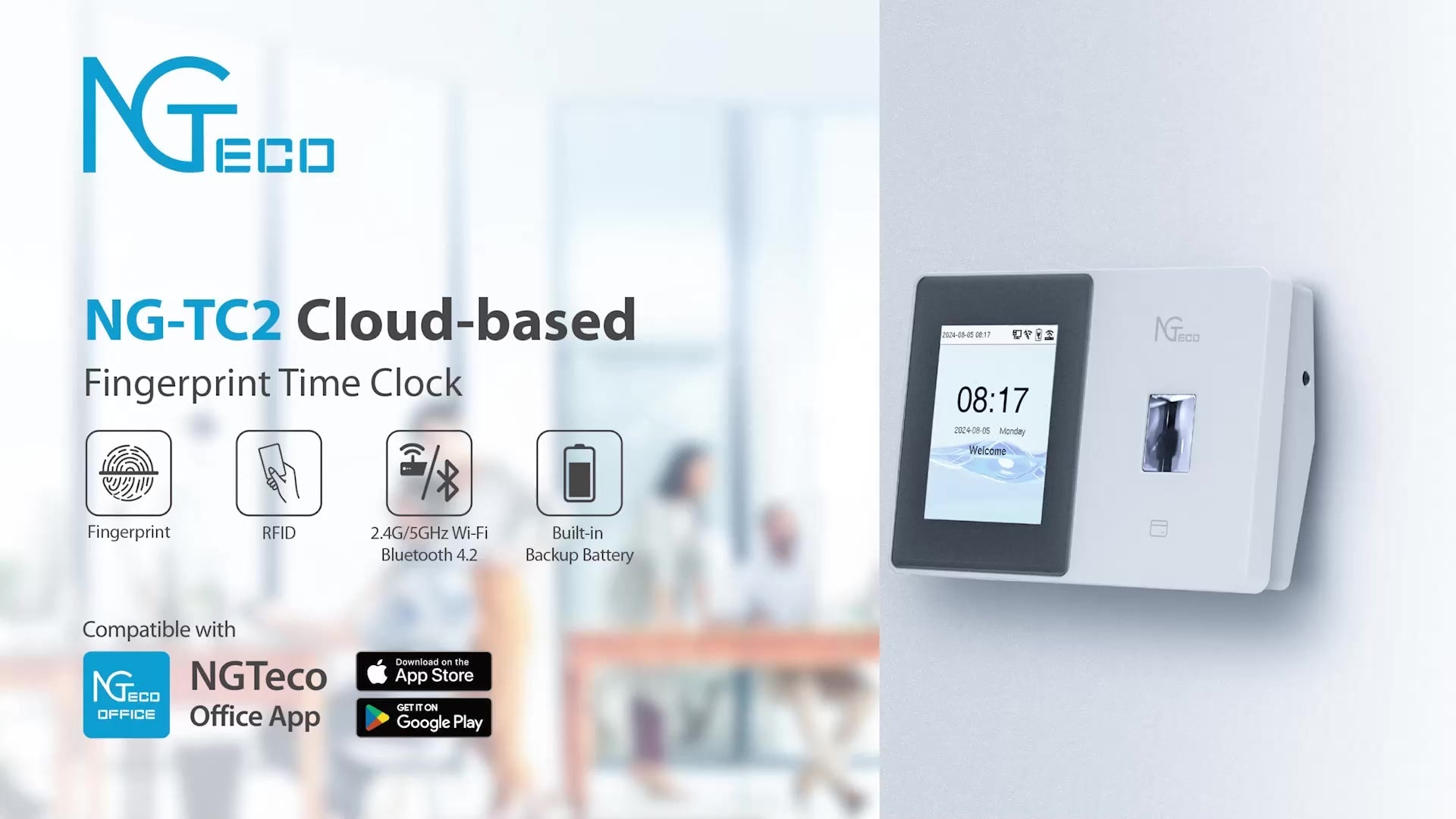
Core Product Features
Cloud-Based Management
Data syncs to the cloud in real-time. Access attendance records anytime, anywhere via the mobile app.
Fingerprint Recognition
High-precision fingerprint identification technology. Quick 0.5-second clock-in with RFID card backup option.
Mobile App Management
NGTeco Office App supports iOS and Android for remote employee attendance management.
Automated Reports
Automatically generates Excel attendance reports with accurate work hour calculations and one-click export.
WiFi Connectivity
Supports 2.4G WiFi and wired network with dual network guarantee for stable operation.
Backup Battery
Built-in backup battery ensures no data loss during power outages and continued system operation.
Complete Installation and Setup Guide
Step 1: Hardware Installation and Device Connection

Begin with physical hardware installation:
- Install Backup Battery: Open the device's back cover and insert the backup battery (ensures data protection during power outages)
- Connect Power: Plug the DC power adapter into the power port on the back of the device
- Network Connection (Optional): If using a wired network, insert the Ethernet cable into the RJ45 port
- Power On: Device screen lights up, displaying the NGTeco startup interface
Installation Tips
Recommend installing the device in a location easily accessible to employees, avoiding direct sunlight and humid environments. The device supports both wall-mounted and desktop installation methods.
Step 2: Download and Register the NGTeco Office App

Managing the attendance system requires first installing the mobile application:
- Download App: Search for "NGTeco Office" in App Store (iOS) or Google Play (Android)
- Register Account: Register a new account using your email address and set a secure password
- Create Organization: On first login, create your company organizational structure (e.g., company name "NGTeco")
- Complete Basic Setup: Fill in company information, attendance rules, and other basic configurations
Account Security Tips
Recommend using a corporate email for registration and enabling two-factor authentication to protect account security. Administrator accounts have the highest privileges, so please keep them safe.
Step 3: Bluetooth Pairing and Device Binding

Link the time clock to your cloud account:
- Enter Device Management: In the app, tap "Device Management" > "Add Device."
- Enable Phone Bluetooth: Ensure your phone's Bluetooth function is turned on
- Scan QR Code: Use the app to scan the QR code displayed on the time clock screen
- Establish Connection: The app will automatically pair with the device via Bluetooth 4.2
- Add Site: Name the device (e.g., "Headquarters Front Desk", "Workshop Entrance", etc.)
Important Notice
Initial pairing requires keeping the phone within 10 meters of the device. After successful pairing, the device will emit a notification sound and display "Binding Successful".
Step 4: WiFi Network Configuration

Connect the device to your enterprise WiFi network for real-time data synchronization:
- Select Network: The app will automatically scan nearby WiFi networks
- Enter Password: Select your enterprise WiFi and enter the password (supports 2.4G band only)
- Connection Verification: The device will automatically test the network connection
- Online Confirmation: Device screen displays WiFi icon and "Connected" status
Network Recommendations
To ensure real-time attendance data upload, recommend using a stable WiFi network. If the office environment has an unstable WiFi signal, you can use a wired network connection. The device supports automatic reconnection functionality.
Step 5: Employee Information Management

Manage employee profiles and attendance rules in the app:
- Add Employees: Click "Employee Management" > "Add Employee", input name, employee ID, department, and other information
- Set Attendance Sheet: Create TimeSheet attendance rules (work hours, break times, overtime rules)
- Assign Shifts: Assign work shifts to employees (e.g., 9:00-18:00 standard shift)
- Permission Settings: Set employee access permissions and attendance point permissions
- Batch Import: Supports Excel batch import of employee information for improved efficiency
Attendance Rules Recommendations
You can create multiple attendance rule templates to accommodate different departmental work systems. Supports flexible work schedules, shift work, fixed shifts, and other attendance modes.
Step 6: Remote Fingerprint Enrollment

Remotely trigger fingerprint enrollment via a mobile app without needing to operate at the device:
- Select Employee: Find the employee who needs fingerprint enrollment in the employee list
- Initiate Enrollment: Click the "Enroll Fingerprint" button. The system sends a command to the device
- Voice Prompt: Device will voice prompt "Please press a finger."
- Three Scans: Employee presses finger on device 3 times, with a 1-second interval between each press
- Enrollment Success: Device displays "Enrollment Successful" and gives voice confirmation
- Data Sync: Fingerprint template automatically encrypts and uploads to the cloud
Fingerprint Enrollment Tips
Recommend that each employee enroll in 2 fingerprint scans as backup. When pressing, ensure fingers are clean and dry, covering the entire recognition area. The system supports storage of up to 3000 fingerprint templates.
Step 7: Daily Clock-In and Real-Time Monitoring

After the system is officially running, employees can start using the time clock:
- Quick Clock-In: Employee places finger on recognition area, completed within 0.5 seconds
- Real-Time Feedback: Device screen displays employee name, clock-in time, and status
- Voice Confirmation: Device voice announces "Clock-in successful" or employee name
- Data Upload: Clock-in records are encrypted and uploaded to the cloud server in real-time
- Mobile Viewing: Administrators can view all clock-in records in real-time via the app
- Exception Alerts: Abnormal situations like late arrivals, early departures, and missing punches automatically push notifications
Step 8: Export Attendance Reports

System automatically calculates work hours and generates professional attendance reports:
- Select Date Range: In the app, set report start and end dates (daily, weekly, monthly reports)
- Select Employees: Can export attendance data for individual employees or all employees
- Automatic Calculation: The System automatically calculates attendance days, late arrivals, overtime hours, etc.
- One-Click Export: Generates Excel format report containing all attendance details
- Report Content: Employee name, ID, date, clock-in time, clock-out time, work hours statistics
- Send Report: Supports multiple methods, including email delivery and file sharing
Report Application Recommendations
Exported Excel reports can be directly used for payroll accounting, performance evaluation, and other HR management tasks. Reports support custom fields and formats to meet different enterprise needs.
Technical Specifications
| Product Model | NGTeco NG-TC2 |
| Recognition Method | Fingerprint Recognition + RFID Card Recognition (Dual Mode) |
| Fingerprint Capacity | Up to 3000 fingerprint templates |
| Recognition Speed | ≤0.5 seconds |
| Recognition Accuracy | FAR: <0.0001%, FRR: <1% |
| Display | 2.8-inch color touchscreen |
| Network Connection | WiFi 2.4G / Ethernet RJ45 |
| Bluetooth | Bluetooth 4.2 (for device pairing) |
| Data Storage | Cloud storage (unlimited capacity) + Local cache |
| Backup Battery | Built-in lithium battery, power outage protection |
| Operating Temperature | 0°C - 45°C |
| Operating Humidity | 20% - 80% RH |
| Power Supply | DC 5V/2A |
| Device Dimensions | 180mm × 135mm × 38mm |
| Weight | Approximately 450 grams |
| Installation Method | Wall-mounted / Desktop stand |
| Voice Prompt | Supports multilingual voice announcements |
| Mobile App | NGTeco Office (iOS / Android) |
| Data Encryption | AES-256-bit encryption transmission |
| Applicable Scenarios | Offices, factories, schools, hospitals, retail stores, etc. |
Key Benefits for Your Business
Eliminate Time Theft
Biometric fingerprint authentication prevents buddy punching and ensures accurate time tracking for every employee.
Reduce Payroll Errors
Automated work hour calculations eliminate manual entry errors and streamline payroll processing.
Increase HR Efficiency
Cloud-based management allows HR teams to access attendance data remotely, saving time on data collection and report generation.
Scale with Your Business
Unlimited cloud storage and support for up to 3000 employees make this solution grow with your company.
Easy Integration
Excel export format ensures compatibility with existing payroll and HR management systems.
Cost-Effective Solution
No monthly subscription fees for basic cloud features. One-time hardware investment with long-term savings.
Frequently Asked Questions
Q: How many employees can the system support?
A: The NG-TC2 can store up to 3000 fingerprint templates with unlimited cloud storage for attendance records.
Q: What happens if the internet connection is lost?
A: The device has local cache storage and will automatically sync data to the cloud once the connection is restored. The built-in backup battery ensures no data loss during power outages.
Q: Can I use this system for multiple locations?
A: Yes, the NGTeco Office App supports managing multiple devices across different sites from a single account.
Q: Is the fingerprint data secure?
A: All fingerprint data is encrypted using AES-256-bit encryption before transmission and storage. Only encrypted templates are stored, not actual fingerprint images.
Q: What if an employee's fingerprint cannot be read?
A: The device also supports RFID card authentication as an alternative. Additionally, each employee can enroll multiple fingerprints for redundancy.
Q: Does this system require any monthly fees?
A: Basic cloud features are included with no monthly subscription. Advanced features may require optional paid upgrades.
Q: How long does installation take?
A: Most installations can be completed in under 3 minutes. The quick start guide walks you through hardware setup, app pairing, and employee enrollment.
Q: Can I customize attendance rules and shifts?
A: Yes, the system supports flexible attendance rules, multiple shift schedules, overtime calculations, and custom work patterns for different departments.
Why Choose NGTeco NG-TC2?
The NGTeco NG-TC2 Smart Fingerprint Time Clock represents the perfect balance between advanced technology and user-friendly design. Unlike traditional punch card systems or manual timesheets, this cloud-based solution provides:
- Real-Time Visibility: Monitor attendance across all locations instantly from your smartphone
- Proven Reliability: Built-in backup battery and dual network connectivity ensure 99.9% uptime
- Rapid Deployment: Get your entire team enrolled and operational in under an hour
- Professional Support: Comprehensive documentation and responsive customer service
- Future-Proof Technology: Regular firmware updates and cloud platform enhancements
Whether you manage a small office of 10 employees or a growing business approaching 100+ staff members, the NG-TC2 scales to meet your needs without compromising performance or accuracy.
Industry Applications
Manufacturing and Warehouses
Track shift workers accurately with ruggedized fingerprint recognition that works even with dirty or worn hands. Monitor overtime and ensure compliance with labor regulations.
Retail Stores
Manage part-time and full-time employees across multiple store locations. Generate payroll reports that integrate seamlessly with POS systems.
Healthcare Facilities
Ensure accurate attendance tracking for medical staff across rotating shifts. Meet compliance requirements with detailed audit trails and encrypted data storage.
Educational Institutions
Track faculty and administrative staff attendance with ease. Generate reports for HR departments and integrate with existing school management systems.
Corporate Offices
Implement professional attendance management for white-collar environments. Support flexible work schedules and remote team coordination.
Construction Sites
Rugged design withstands harsh environments. Track temporary workers and contractors with quick enrollment and easy management.


Share:
NGTeco TC1 Smart Time Clock Complete Setup Guide
Smartest Black Friday Deals for Your Business