
Friday afternoon, and the timesheet still has gaps. A shift that started early, a lunch nobody logged, a sticky note that reads "came in about 8." Time clocks that calculate hours close those gaps at the source, so weekly totals come from real punches rather than memory. The whole problem, and its fix, at a glance:
| Your Symptom | The Real Cause | The Fix |
| Hours get rebuilt from memory every Friday | Punches were never captured cleanly | A fixed clock-in and clock-out routine |
| Totals never match what employees recall | Missed punches surface days later | Same-day checks and quick corrections |
| The weekly math eats an entire afternoon | Records live on paper, texts, and memory | A time clock that totals hours for you |
Why Do Work Hours Get Messy So Fast in a Small Business?
A five-person shop seems too small for timekeeping trouble. In practice, small teams hit it harder because everyone wears three hats and nobody owns attendance. Here is how the mess usually starts:
- Forgotten punches. Someone rushes in to open the store and clocks in an hour later, if at all.
- Early arrivals and late stays. Did the extra 20 minutes count as work? Nobody wrote it down.
- Split shifts. A morning block plus an evening block doubles the chances of a missing punch.
- Unrecorded lunches. A 30-minute break taken, or skipped, with no trace either way.
- Handwriting. Is that a 7 or a 9? At the end of the week, that single digit matters.
- After-the-fact corrections. "Put me down for 8 to 4," offered days later, from memory.
Notice what these have in common: not a single item on the list is a math problem. The arithmetic of adding hours is simple; the source data is what breaks. So a calculator, free or paid, can only be as good as the punches you feed it. Clean records come first, and that shifts the goal from "find a better calculator" to "capture better punches."
What Should Time Clocks That Calculate Hours Really Track?
When owners search for an employee time clock calculator, they usually picture a tool that adds 9:02 to 5:14. Useful, but too narrow. What you need by Friday is a set of numbers you can check against reality:
- Daily totals for each person, with breaks already subtracted
- Weekly totals you can scan in minutes
- Missed punches, flagged rather than buried
- Edited records, marked so you know what changed and why
- Break records, visible rather than assumed
- Overnight notes if anyone works past midnight, so a single shift never splits into two days
A time clock work calculator that shows all of these gives you something to verify. A bare sum gives you a number to trust blindly.
How to Calculate Work Hours by Hand
Sometimes you still need the manual method, so here it is in four steps:
- Convert punch times to 24-hour format: 5:30 PM becomes 17:30.
- Subtract the start from the end: 17:30 minus 8:00 equals 9 hours 30 minutes.
- Subtract unpaid breaks: 9 hours 30 minutes minus a 30-minute lunch equals 9 hours.
- Convert leftover minutes to decimals so the totals add cleanly.
| Minutes Worked | Decimal Hours |
| 15 | 0.25 |
| 30 | 0.50 |
| 45 | 0.75 |
That last step trips people up: 8 hours 45 minutes is 8.75, not 8.45. Run the routine across six people and five days, and you see why a machine that handles it for you wins.
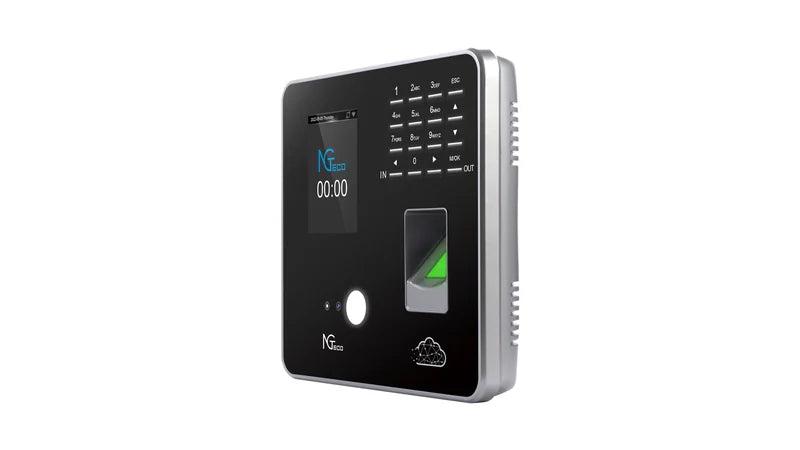
Are online work time clock calculators enough? For a single shift or a quick what-if, yes. As a team's long-term record, no. They keep nothing, so next week you start from zero again. That gap is where a dedicated machine pays off: with an NGTeco cloud-connected time clock, each punch syncs to the app over Wi-Fi, and your daily and weekly totals build on their own, ready to review wherever you are.

Time Clock Calculator vs. Employee Time Clock: What Is the Difference?
Three tools get mixed up in search results, and they solve different problems. The table sorts them out:
| Tool | Best For | Main Limitation | Better Use Case |
| Paper punch clock with manual tally | Teams that like a physical card ritual | Every card still gets added up by hand, line by line | A backup record, not the math itself |
| Online time clock calculator | A quick one-off total | Saves nothing | Checking a single disputed shift |
| Spreadsheet | Teams of two or three with steady schedules | Manual entry invites typos | A stopgap while you pick a machine |
| Employee time clock | Daily punches for a whole team | Needs a small setup effort | Ongoing, reviewable, exportable records |
The deciding question: Do you need records you can revisit weeks later?
If a number gets challenged in March, a calculator result from January is gone, a spreadsheet cell may have been overwritten, and a stack of paper cards still leaves the adding to you. With digital tracking, punch records stay put and arrive already totaled.
Pick based on how often you clock employee time, not on price alone.
How Can Small Businesses Reduce Manual Time Edits?
Buying a machine helps, but habits finish the job. Edits drop fastest when your team treats punches as same-day business:
- Set a fixed punch routine. Clock in at the door, every time. Ritual beats memory.
- Check for missed punches daily. A two-minute scan at closing catches gaps while everyone still recalls the day.
- Ask employees to report errors immediately. "I forgot at lunch" on Tuesday is easy to fix; on Friday, it becomes a guess.
- Confirm every edit with a reason. A short note, like "door punch missed, verified with the opener," keeps trust intact.
- Never reconstruct a week on the weekend. Five days of memory work produce five days of soft numbers.
The pattern behind all five: shrink the distance between the mistake and the fix.
What you need is a good time clock machine that gathers punch records in one place and makes that daily scan painless.
What Features Matter When You Want Cleaner Hour Totals?
Keep the shopping list short. Six things earn their place:
- A clear punch flow, so a new hire gets it on day one
- Several punch options (fingerprint, face, PIN, or card), so wet hands or a forgotten badge never block a punch
- Manager review access, so checking the week takes minutes
- Exportable records, so totals move on without retyping
- Missed-punch visibility, so gaps announce themselves
- Overnight shift support, if anyone works past midnight
Then match the machine to your setup. With reliable Wi-Fi at the site, you can run a cloud-connected model like the NGTeco TC1: your team punches by face, fingerprint, PIN, or card, the records flow into the app, and you can review totals from home or across locations. With no internet on site, an offline model like the AS10 still captures every fingerprint punch on the machine itself, and you can pull the records onto a USB drive whenever you need them. Either way, you stop carrying the week in your head.

Make Friday a Quick Read with NGTeco
What a small business needs by Friday is not another spreadsheet. It is a single clean record that both sides agree on. When punches get captured the moment they happen, weekly totals stop being an argument and become a quick read. Pick a time clock that calculates hours for you, build the daily check habit, and the weekly reconstruction ritual disappears, along with the guesswork it ran on.
FAQs about employee time tracking
Q1: What is the easiest way to calculate work hours?
Capture exact in and out times, subtract unpaid breaks, then convert leftover minutes to decimals (15 minutes = 0.25). A time clock that totals hours automatically removes the manual math entirely.
Q2: Are online time clock calculators enough for a small business?
They work for a single shift check. They store nothing, though, so a team that punches daily will want a machine that keeps a running record from week to week.
Q3: How often should managers review employee hours?
A short daily scan plus a weekly confirmation works best. Daily checks catch missed punches while memories are fresh, and the weekly pass then becomes verification rather than detective work.
Q4: Can a time clock reduce missed punch edits?
Yes. A consistent punch routine paired with several punch options cuts forgotten punches sharply, and any gaps that remain get flagged and fixed the same day rather than rebuilt later.


Share:
Time Clock Rules for Hourly Employees: What Every Small Business Owner Needs to Know
Facial Recognition Time Clock vs Fingerprint Time Clock: Which Fits Your Workplace?