
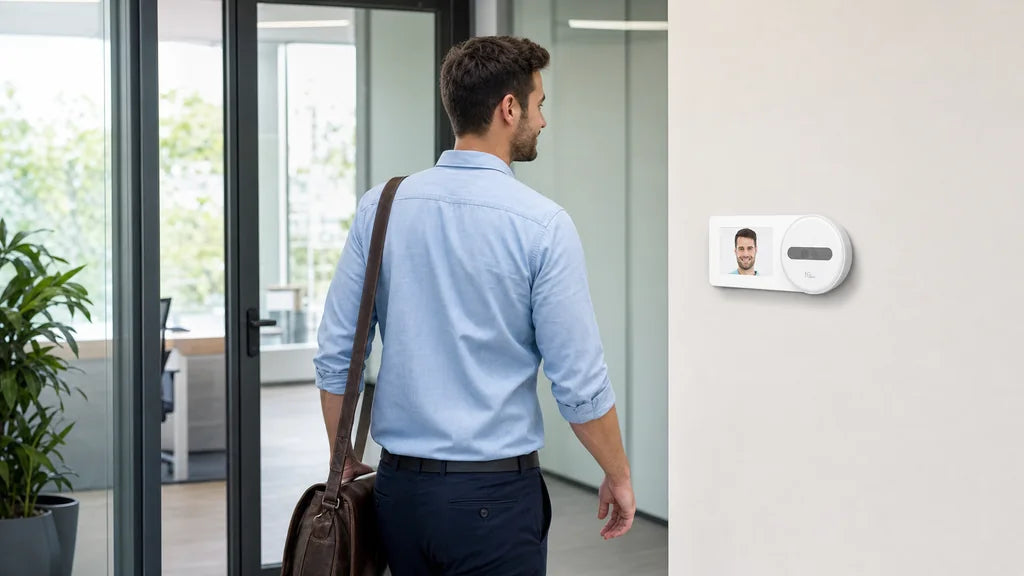
Mount a facial recognition time clock at roughly typical face height, in a spot employees can walk straight up to, with light coming from the front instead of behind. That single combination fixes most slow or failed punches on a face recognition time clock.

Choose a Straight Approach With Enough Standing Space
The starting point for any installation is the path employees take to reach the clock, not the clock itself. A rushed or angled approach is one of the most common reasons a face id time clock takes two or three tries instead of one.
Why Approach Angle Matters
- A doorway that swings open right next to the clock forces people to step in at an angle
- A narrow hallway pushes employees to lean in sideways instead of facing forward
- A spot behind a pillar or shelf blocks a clear, direct line to the camera
Minimum Space Guidelines
| Space Type | Recommended Clearance |
|---|---|
| Approach path to the clock | At least 3 feet of straight, unobstructed walking space |
| Standing distance from the camera | About 1 to 3 feet, depending on the model |
| Space beside the clock | Room for one person to wait without crowding the person scanning |
A clock placed along a straight, open path gets a square, centered face on the first attempt far more often than one tucked into a corner.

Mount the Camera Near Typical Face Height
Once the approach path is set, camera height decides whether that straight walk actually lines up with the lens. Most face-recognition cameras, including NGTeco’s, are tuned for a face height range of roughly 4.5 to 6 feet, which covers standing adults from just under five feet to about six foot two.
Recommended Mounting Height by Team
| Team Type | Suggested Mounting Height |
|---|---|
| Mostly standing adults, average height | About 5 to 5.5 feet from the floor |
| Mixed height team with a wide range | Slightly lower, around 4.5 to 5 feet, tilted up a few degrees |
| Team that includes wheelchair users or seated staff | A second lower unit, or an adjustable mount, set at seated eye level |
Adjusting for a Mixed-Height Workforce
A single fixed height rarely fits everyone well. A camera tilted down a few degrees from a slightly lower mount usually captures a wider range of heights than one mounted high and tilted up, since employees on the shorter end otherwise end up looking upward and losing part of their face from the frame.
Use Even Front Lighting and Avoid Strong Backlight
Height and angle only help if the camera can actually see the face clearly, which comes down to where the light is coming from. The best lighting for a facial recognition time clock comes from in front of or beside the employee’s face, never from directly behind it.
Good Light Sources
- Overhead ceiling lights positioned in front of the standing spot, not behind it
- Soft, diffused light rather than a single bright bulb
- Consistent indoor lighting that does not change much between morning and evening shifts
Light Placements to Avoid
| Placement | Problem It Causes |
|---|---|
| A window directly behind the clock | Turns the employee’s face into a dark silhouette |
| A single bright spotlight overhead | Creates harsh shadows under the eyes and chin |
| A doorway to the outside behind the camera | Changes brightness every time the door opens |
Control Glare, Shadows, and Changing Daylight
Even a well-placed camera can lose accuracy as the light in the room shifts through the day, so this deserves a separate check from the initial lighting setup. Glare and shadow problems tend to be time-of-day issues rather than fixed ones.
Common Glare and Shadow Sources
- Direct sunlight through a nearby window at certain hours
- Reflections off a glass door or a shiny wall behind the employee
- Fluorescent lights that flicker or cast a greenish tint on skin tone
Fixes That Hold Up Across the Day
Add a blind or frosted film to any window within the camera’s field of view, since blocking direct sun is more reliable than trying to compensate with software. Test the clock at opening time, midday, and closing time before calling the installation finished, because a spot that looks fine at 9 a.m. can face full sun by 3 p.m.

Check Network, Power, and Wall Conditions
Good lighting and a good angle only matter if the clock is actually online and powered, so the physical mounting spot needs a quick technical check before installation. None of NGTeco’s face-recognition models include a battery backup, so a stable, nearby power source is not optional.
Wi-Fi and Power by Model
| Model | Wi-Fi Band | Face Capacity |
|---|---|---|
| NG-TC5 | 2.4GHz | 200 |
| TC1 | 2.4GHz | 200 |
| MB1 | 2.4GHz | 200 |
| NG-TC7 | 2.4GHz | 500 |
| TC3 | 2.4GHz and 5GHz | 500 |
Wall and Mounting Considerations
Check the wall material before drilling, since drywall, brick, and metal studs all need different anchors. Confirm the Wi-Fi signal at the exact mounting height, rather than near the router alone, because a weak signal a few feet off the floor can still show full bars on a phone held higher up.
Run Recognition Tests Before Final Installation
Everything above is a prediction until it gets tested with real faces in the real spot, so treat the first mount as temporary. A short test period catches problems that are cheap to fix before drilling and expensive to fix after.
What to Test Before Drilling
- Have three or four employees of different heights scan at the proposed spot
- Test at the start, middle, and end of a typical shift to catch changing daylight
- Confirm recognition speed feels close to instant, not a multi-second delay
When Lighting Cannot Be Fully Controlled
Some spots, like an entrance with a large uncovered window, never get lighting fully under control no matter how the camera is angled. For those locations, a multi-method model such as the TC1, TC3, or NG-TC7 gives employees a fingerprint, password, or identification (ID) card fallback so a bad-lighting day never blocks a punch. A dedicated face-only model like the NG-TC5 works best in spots where lighting stays consistent year-round.
Set Up Your Facial Recognition Clock the Right Way
Place the clock along a straight approach, mount it near face height, and light it from the front rather than the back. Test at different times of day before finalizing the mount, and check Wi-Fi strength and power at the exact spot first. Where lighting cannot be fully controlled, a multi-method model like the TC3 keeps punches moving on the days recognition alone falls short.
Facial Recognition Time Clock FAQs
Q1: Does facial recognition still work for employees who wear glasses?
Yes, in most cases, since modern facial recognition reads facial structure rather than relying on features that glasses would cover. Heavily tinted or reflective lenses can occasionally slow down a scan, and removing them for the enrollment photo usually improves accuracy going forward.
Q2: Can a facial recognition time clock be installed outdoors?
It is not recommended for most facial recognition units, since direct sun, rain, and temperature swings all interfere with both the camera and the electronics. An indoor entryway just inside the door is a better option that still catches employees as they arrive.
Q3: How many face profiles can one NGTeco time clock store?
It depends on the model. The NG-TC5, TC1, and MB1 each hold up to 200 face profiles, while the TC3 and NG-TC7 hold up to 500, which matters more for larger sites than for a single small office.
Q4: Does a facial recognition time clock need a different privacy notice than a fingerprint clock?
Often yes, since several states treat facial geometry as biometric data subject to the same consent and notice rules as fingerprints, and a few apply additional requirements specifically to facial data. A quick check of state-specific biometric privacy law before rollout is worth the time, since requirements vary by jurisdiction.

Q5: What happens if the camera cannot recognize someone because of a recent haircut or new glasses?
A significant change in appearance can lower the match confidence enough to cause a failed scan, though most systems still recognize the person after a normal try or two. If failures continue for more than a few days after a visible change, re-enrolling with a fresh photo usually resolves it.


Share:
Why a Fingerprint Time Clock Fails to Recognize an Employee and How to Fix It
Why the Hours on Two Attendance Reports May Not Match