
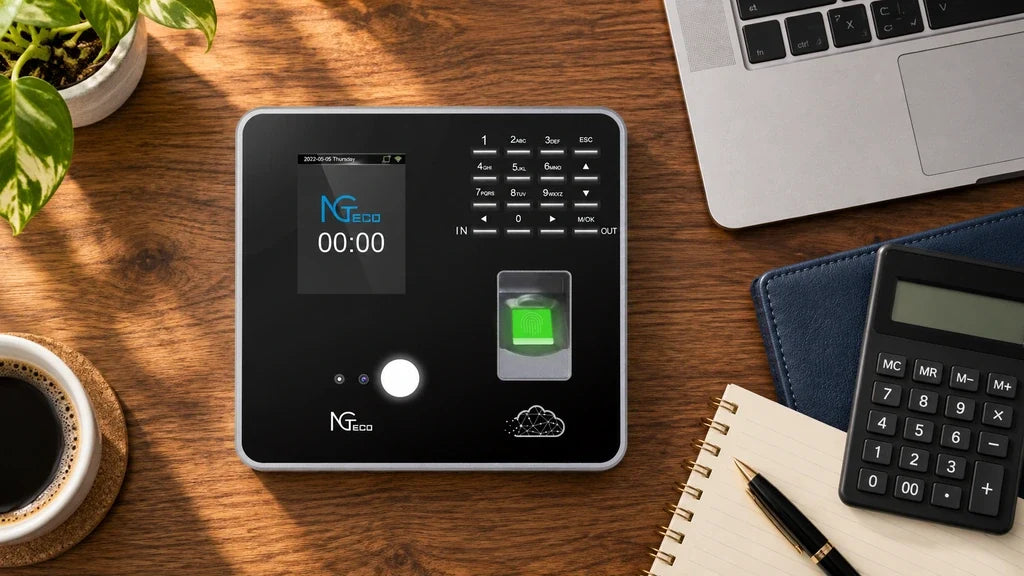
Small businesses need a broader time and attendance system when punch records create recurring work after employees clock in. A single terminal can be enough for one stable location with one reviewer and a simple pay-period routine. As teams, locations, approvals, or reporting needs grow, the right answer is a connected workflow that makes ownership and record review clear.
- Use a basic local workflow when one person can review one location’s records without repeated consolidation.
- Add connected record access when managers need to review punches away from the terminal or across locations.
- Define the process first, then select the employee time clock system that supports it.

A Time Clock Is One Part of a Time and Attendance System
A time clock records the punch, while a time and attendance system governs what happens to that record next. The terminal is where an employee clocks in, clocks out, or verifies an identity. The system includes the people who review records, the rules they apply, the reports they need, and the tools used to keep the process moving.
That distinction matters because hardware alone does not decide who checks a missed punch, approves a correction, or prepares final hours for payroll.
The Terminal Records the Event
The terminal should make the basic event dependable: an employee identifies themselves and the device records the time. The appropriate verification method depends on the workplace.
For example, the AS10 is an offline time clock for small teams that do not need Wi-Fi, a network, or cloud access for their routine. A local workflow can work well when the person responsible for records can retrieve and review them at the same site.
The System Handles the Follow-Through
The broader time and attendance system begins after the punch. It determines how a manager spots an exception, corrects a record, checks work hours, and prepares information for payroll.
Avoid assuming every system includes scheduling, payroll integration, or human resources functions. Those capabilities vary. The practical question is whether the business can review time records accurately with its current process, not whether a product carries the longest feature list.
The Simple Timekeeping Workflow
A simple employee time clock system can be the right fit when the record-review routine is stable and easy to own. The best starting point is to map what happens from the first punch of the pay period through the final handoff to payroll.
One Location and One Record Owner
Many small teams can keep timekeeping straightforward when they work from one location, use a consistent clock-in routine, and have one designated person review the records.
A simple workflow usually has these characteristics:
- Employees use the same terminal at the same location.
- One person reviews records on a regular schedule.
- Corrections are uncommon and follow one clear approval path.
- Payroll receives a report or prepared total without combining several separate sources.
In this situation, a local time clock can reduce informal, memory-based tracking without adding an unnecessary administration layer.
A Repeatable Review Routine
The review step is what keeps a simple process reliable. Set a regular time to look for missing punches, unexpected early or late entries, and records that need an employee or manager to confirm them. Resolve questions before the payroll cutoff, rather than relying on memory after the period closes.
The reviewer needs to know which report is final, where it is stored, and who can change it. If those answers stay consistent, connected access may not be necessary.
When a Small Business Outgrows a Basic Time Clock
Time and attendance systems for small businesses become valuable when a basic terminal leaves people to manually bridge gaps between records, reviewers, and locations. The number of employees matters, but process friction is usually the stronger signal.
Signs That Manual Work Is Growing
Look for repeated situations that make the current time clock management system harder to operate:
- Two or more people need to review or approve records.
- A manager needs to check attendance while away from the terminal.
- Separate locations create separate files that someone must combine.
- Missed punches or corrections arrive often enough to disrupt the payroll routine.
- Reports require repeated copying, sorting, or reconciliation before they are useful.
- Different shifts need rules that are difficult to track in a local process.
One occurrence does not always require a new system. A recurring pattern does. State the operational requirement in plain language, such as “Managers need web access to current records,” rather than “We need more features.”
Separate Needs From Nice-to-Haves
After identifying the friction, label each requirement as mandatory, desirable, or unnecessary for now. Mandatory requirements protect the payroll process or remove a recurring bottleneck. Desirable requirements save time but can wait. Unnecessary items add cost or setup work without solving a real problem.
This prevents buying a broad platform, then using only the punch screen. The better system closes a specific gap between the punch and the final report.

The Requirements That Shape the Right System
The right system follows the business’s record flow, verification needs, and review responsibilities.
Use this table to turn daily workflow into decision criteria.
| Requirement | Questions to Ask | What It May Point To |
|---|---|---|
| Employee count | How many people need to enroll and clock in? | A terminal with capacity that fits the current team and reasonable growth |
| Verification method | Is a password, fingerprint, face, or card process appropriate for this workplace? | A device that offers the approved punch methods |
| Connectivity | Is local access enough, or must records be reviewed remotely? | An offline terminal or a Wi-Fi-connected workflow |
| Record access | Who needs to see records, and from where? | A local report routine or web and mobile access |
| Correction ownership | Who can investigate and approve a missed or disputed punch? | Defined roles and an exception-review process |
| Exports and reports | What does payroll receive, and how often? | A report format and review schedule that match the payroll handoff |
Mark each item before comparing options. A requirement without an owner remains a process gap, even if a device has a related feature.
Start With the Payroll Handoff
Begin at the end of the pay period. Identify the report payroll needs, the reviewer, and the deadline. Then trace backward to determine the exceptions, approvals, and access needed before that handoff.
If payroll only needs a locally reviewed record and the team is stable, a local process may remain appropriate. If several people need current records before the deadline, connected review tools can remove manual transfers.
Test the Exception Path
Test one normal exception, such as a missed clock-out. The business should know where it appears, who reviews it, and how the final record reaches payroll.
If that path involves several phone calls, files, or delayed updates every pay period, prioritize a more connected time clock management system.
NGTeco Paths for Local and Cloud-Connected Workflows
We offer local and connected paths. Choose based on who needs access to attendance records and how often.
Local Record Review With AS10
Choose AS10 when a small team wants an offline terminal and a local record-review routine. Its official product page describes it as a basic time clock that does not require Wi-Fi, a network, or cloud access.
AS10 is not the right route when managers need to review attendance from several locations or away from the device. In that case, the limitation is not the reliability of a local terminal. It is the need for a connected review process.
Connected Attendance Review With TC1 and TC3
Choose a connected workflow when the same attendance data needs review at different locations or away from the terminal. The TC1 supports remote attendance management, multi-device synchronization, mobile and web access, and real-time reports on its US product page.
For teams that need several punch methods and a touchscreen, TC3 supports face recognition, fingerprint scanning, radio-frequency identification card use, and personal identification number entry. Confirm the workflow and employee enrollment plan before selecting a biometric method, and obtain legal advice where local privacy rules may apply.
Match the System to the Work You Actually Do
Start with the payroll handoff and the exception path, then choose the smallest workflow that handles both reliably. AS10 fits a local, offline record routine. TC1 and TC3 fit teams that need connected attendance review. Compare the local AS10 workflow with the connected TC1 workflow or TC3 options before deciding.
Frequently Asked Questions
Q1: Can a time clock replace payroll software?
Usually no. A time clock creates attendance records, while payroll software handles pay calculation, taxes, and payment tasks. Before relying on any report for payroll, confirm which details the payroll process needs and who checks the report for exceptions. The two tools can work together without performing the same job.
Q2: Should employees be told who can see their time records?
Yes. Give employees a clear contact for missed punches, corrections, and questions about their recorded time. A published process helps employees raise a concern before payroll is finalized and helps managers avoid informal changes that lack an audit trail.
Q3: What should a manager do if a connected time clock loses Wi-Fi?
First, verify that employees can continue following the approved clock-in procedure and notify the record owner that synchronization needs review. The current TC1 product page states that it continues recording punches when the network is down and syncs data after the connection returns. Confirm the behavior for the exact model and configuration before relying on it in a policy.


Share:
Time Clock With No Monthly Fee: What Should a Small Business Check Before Buying?