
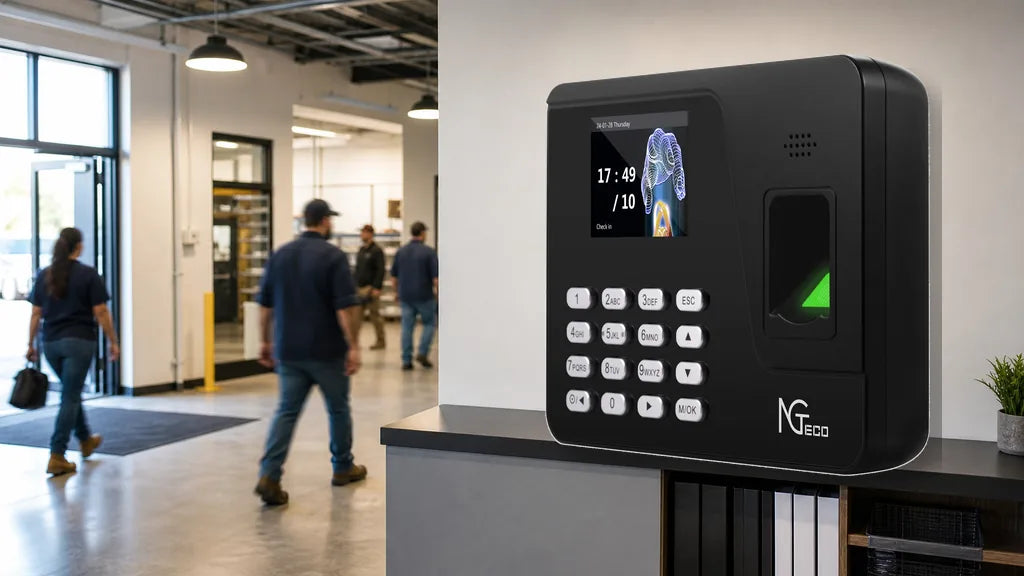
The best time clock for small business operations depends directly on staff headcount. Small groups operate efficiently on basic offline hardware, while larger teams demand automated cloud connectivity and massive data capacity. Always buy a device that supports 1.5 times your current staff size to accommodate growth seamlessly. Match your exact headcount to the right features below.

Why Team Size Decides Which Clock You Need
Staff headcount operates as the primary filter when evaluating hardware features. The number of daily users determines the memory capacity and verification speed required. A small office operates efficiently on simple hardware, whereas a large warehouse requires high data capacity and fast biometric sensors. Always apply a buffer of 1.5 times your current staff size.
Hardware Memory Limits
Headcount directly dictates the required user capacity of the device. Small devices cap out early, while larger groups generate numerous punch records daily. The device needs sufficient memory to hold all logs between network syncs. Every time clock features a specific ceiling for users and daily logs, and surpassing this ceiling often causes data overwriting.
Verification Speed Demands
Small teams frequently manage fine with manual PIN codes or offline USB downloads, whereas larger groups require automated cloud uploads to handle high data volume. More people also mean higher physical traffic at the entrance. Faster verification methods become necessary to prevent bottlenecks, and facial recognition operates significantly faster than manual keypads.
Applying The Capacity Buffer
Purchase a model that supports 1.5 times your current employee count. A group of ten requires a device rated for at least fifteen users. This multiplier provides adequate room for seasonal hires or permanent business expansion, ensuring the hardware lasts through typical growth cycles without system overloads.

Time Clock for a 5-Person Team
The buffer rule points directly to economical hardware for micro-businesses. The AS10 model at $99 offers basic offline functionality, while the TC5 model provides a touchless facial recognition upgrade for $149.99.
Basic Offline Hardware
A time clock for 5 employees functions perfectly without internet connectivity. The AS10 keeps operations simple and offline by allowing managers to extract punch logs directly via a USB flash drive. This approach eliminates monthly software fees and network configuration entirely, making its $99 price point highly accessible for startup businesses.
Advanced Verification Options
Some small offices prefer modern touchless entry methods. The TC5 model introduces facial scanning for $149.99, allowing workers to punch in simply by looking at the camera lens. Face scanning effectively prevents buddy punching and keeps the device exterior cleaner over time.
Hardware Installation Steps
Basic offline models feature straightforward wall-mount installation. The bracket requires only a few screws, and the device plugs directly into a standard electrical outlet without needing Ethernet cabling or Wi-Fi configuration.

Time Clock for a 10-Person Team
Moving into double digits changes hardware connectivity demands. A time clock for 10 employees requires evaluating remote access needs: the K4 handles local offline data, while the TC1 introduces automated cloud features.
Offline Local Storage
The K4 model serves locations without stable internet connections. Ten workers generate multiple punches daily, which the K4 stores reliably on internal memory chips for weekly USB extraction. This offline storage setup works exceptionally well for single-location retail shops and workshops.
Cloud Connectivity Upgrades
Many ten-person teams have managers working offsite or traveling. The TC1 model introduces vital cloud connectivity, enabling supervisors to review attendance records over Wi-Fi directly from smartphones or laptops.
Remote Management Tools
Remote access transforms daily attendance management. The TC1 syncs records continuously, allowing administrators to check arrival times without being on-site. Supporting RFID cards and facial recognition, the unit accommodates moderate traffic volume smoothly.

Time Clock for a 20-Person Team
The jump to twenty workers makes manual data retrieval inefficient. The TC1 represents the optimal time clock for 20 employees, supporting up to 200 users alongside multi-modal authentication.
Traffic Management Methods
Twenty people arriving simultaneously create bottlenecks at entry points. The TC1 processes facial recognition rapidly to keep lines moving, while also allowing workers to tap RFID badges. Providing multiple verification methods prevents delays if an employee forgets a physical badge.
Cloud Integration Demands
Exporting logs manually for twenty workers wastes administrative hours. The TC1 syncs data to the cloud automatically for real-time dashboard reporting, while its 200-user capacity accommodates staff turnover and contractors effortlessly.
Multi-Modal Entry Benefits
Combining face scans, RFID badges, and PIN codes provides total flexibility. If poor lighting affects facial verification, employees can immediately swipe an RFID card, ensuring seamless clock-ins across diverse work environments.
Time Clock for a 30-Person Team
Expanding beyond twenty workers tests hardware endurance and interface responsiveness. While the TC1 covers thirty staff members comfortably, the TC3 model provides an enhanced touchscreen interface and faster processing.
High Capacity Sustainment
Thirty active employees generate substantial monthly attendance records. The TC1 manages standard volume reliably, storing and encrypting user profiles within internal memory.
Touchscreen Interface Upgrades
The TC3 features a responsive capacitive touchscreen, making administrative menu navigation significantly faster. Enrolling new employees takes seconds directly on the screen, backed by an upgraded processor for rapid biometric matching.
Administrator Interface Navigation
Managing thirty profiles requires an intuitive visual interface. The TC3 enables administrators to add, edit, or remove profiles directly on the high-resolution display, while its durable exterior withstands heavy daily use.
Time Clock for a 50-Person Team
Fifty workers represent an operational scale requiring commercial-grade hardware. The TC3 serves as the best solution for 50 employees due to its massive 50,000-record local storage vault.
Massive Record Storage
Fifty employees clocking in and out daily produce thousands of punches weekly. The TC3 holds up to 50,000 log entries locally, safeguarding against data overwrites during extended accounting periods.
Network Failure Protections
Internet dropouts can interrupt real-time logging. The TC3 protects data during network outages by storing punches locally and automatically uploading all cached records once the Wi-Fi connection is restored.
Heavy Duty Performance
A fifty-person group places continuous physical demand on hardware. The TC3 facial recognition engine identifies staff in fractions of a second even with large databases, reducing shift-change queues.
Quick Match Table
The table below summarizes the optimal hardware choices by staff headcount:
| Team Size | Recommended Pick | Core Reason |
|---|---|---|
| 5 | AS10 / TC5 | Economical offline operation or entry-level facial recognition |
| 10 | K4 / TC1 | Choice between standalone USB storage and Wi-Fi cloud syncing |
| 20 | TC1 | Automated cloud syncing with facial recognition and RFID options |
| 30 | TC1 / TC3 | Upgrade to TC3 for capacitive touchscreen navigation and speed |
| 50 | TC3 | Massive 50,000-log offline storage and commercial-grade durability |
Always apply the 1.5x buffer rule before purchasing to prevent premature hardware replacement as your business scales.
Upgrade Your Hardware Today
Evaluate your current employee headcount, apply the 1.5x capacity buffer, and select the time clock model tailored to your workflow. Micro teams operate seamlessly with the AS10 or TC5, while growing businesses benefit from the advanced cloud capabilities of the TC1 and TC3. Explore the full range of NGTeco time clocks to streamline your attendance tracking today.
Time Clock Size FAQs
Q1: What time clock is best for 10 employees?
The TC1 is ideal for ten employees, offering automatic Wi-Fi cloud synchronization for remote smartphone monitoring along with RFID and facial recognition options.
Q2: Can a small office use a basic offline device?
Yes, offline models like the AS10 or K4 work reliably for small teams by exporting attendance data via USB drives, avoiding recurring monthly software subscriptions.
Q3: How many employees can one time clock handle?
Capacity varies by model, ranging from 200 user profiles on compact units up to thousands of users on enterprise-level hardware with high-capacity memory chips.
Q4: Should I size up for a growing staff?
Always choose a device rated for at least 1.5 times your current headcount to accommodate seasonal staffing surges and future business expansion without technical bottlenecks.
Q5: Does facial recognition work well for large groups?
Modern biometric sensors verify employees in under one second, eliminating physical bottleneck lines significantly faster than manual PIN keypads.


Share:
Do You Need a Computer to Use a Time Clock?
Can Two Businesses Share One Time Clock?